Click on image above to load the animation. Flash-based animation provided by the Ruffle Flash Emulator at ruffle.rs. This project requires JavaScript enabled in the web browser to run. Then click the small "play ball" button in the lower left corner to start the animation.
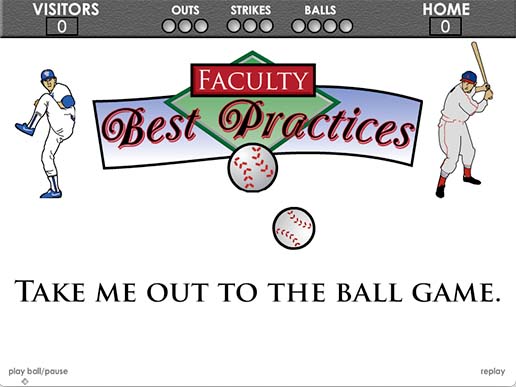
Flash based presentation playing the music for "Take Me Out To The Ball Game" along with a bounding baseball synchronized over each word as the music is sung. Shown on screen is a logo for the Heartland Community College Faculty Best Practices along with a vector graphic of pitcher Nolan Ryan and batter Stan Musial and an animated scoreboard showing runs, balls, strikes and outs.
Navigate to previous or next portfolio item:
For Previous Item: Alt + p on Windows OS or Control + Alt + p on Mac OS
For Next Item: Alt + n on Windows OS or Control + Alt + n on Mac OS
Take Me Out to the Ballgame Flash Animation Project Information
Goal of the Project
Shortly after starting working as the Media Technologist at Heartland Community College I was tasked with creating an animation showing the words to the song "Take Me Out to the Ballgame" by Edward Meeker from 1908 as part of a Spring 2008 All Campus Kickoff Event held at the college. The project needed to show the words to "Take Me Out to the Ballgame" as well as play the song so the audience could sing along with the song as an opening event to the days presentations.
Project Specs
Category
Animation Design
Interactive Design
Software Used
(click icon to view name)
Audience
Heartland Community College Administrators
Heartland Community College Instructors
Heartland Community College Employees
Solution to the Problem
In addition to showing the words to the song as the song plays, I decided to add the bouncing baseball to indicate the words to be sung timed to the music. I designed the overall layout, background graphics, baseball players and logo in Adobe Illustrator CS3. Then I imported those graphics into Adobe Flash CS3 and animated the text and ball on screen. After that I added the play ball, pause, and replay buttons along the lower left and right of the screen for added animation controls.
Ruffle Emulator for Flash Files
The example of the Take Me Out to the Ballgame animation on my portfolio above is running in Flash using a Flash Emulator called Ruffle. More information about the Ruffle Flash Emulator is available at Ruffle.rs.
Outcome of the Work
This flash design was only used for one All Campus Kickoff event in the Spring 2008 but attendees at the event seemed to enjoy the playful aspect of this animation presentation and singing alone with the song.